

Spark Execution Modes: Cluster, Client, and Local
Basics of spark execution modes

Introduction
Apache Spark’s execution modes determine where your driver program runs and how it communicates with executors. This seemingly simple choice has profound implications for debugging, fault tolerance, and production reliability.
The three execution modes: local, client, and cluster, each serve distinct purposes. Understanding when to use each mode prevents common pitfalls like disappeared logs, network timeout failures, and resource contention issues.
Whether you’re developing interactively, testing on small datasets, or deploying production workloads, choosing the right execution mode is critical for success.
Core Concepts
Local Mode
In local mode, all Spark components (driver, executors, and cluster manager) run on a single machine using multiple threads. This is the simplest deployment model.
Architecture
Driver and executors share the same JVM process
No network communication overhead
Limited by single-machine resources
Configuration
from pyspark.sql import SparkSession

spark = SparkSession.builder \
    .appName(”LocalModeExample”) \
    .master(”local[*]”)  # Use all available cores \
    .getOrCreate()

# Run your transformations
df = spark.read.parquet(”data.parquet”)
df.groupBy(”category”).count().show()
The local[*] syntax tells Spark to use all available CPU cores on your machine. You can also specify local[4] to use exactly 4 cores.
Best for
Learning Spark basics and experimenting with APIs
Unit testing Spark transformations with small datasets
Rapid prototyping before scaling up
Running Spark on laptops or single-node environments
Limitations
Cannot process data larger than single-machine memory
No fault tolerance or high availability
Poor performance on large datasets
Client Mode
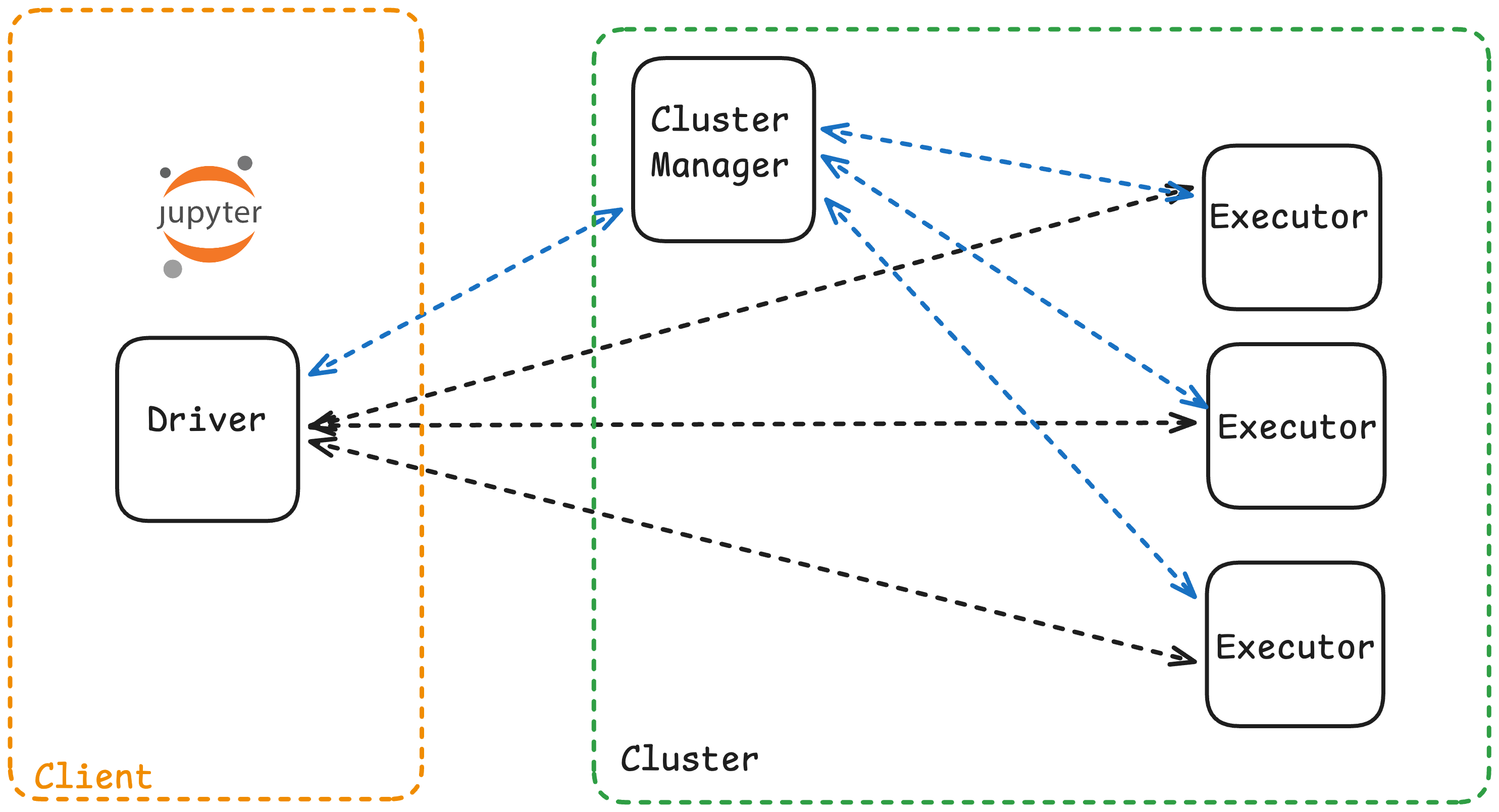
In client mode, the Spark driver runs on the machine that submits the job (your laptop, a gateway node, or edge server), while executors run on cluster worker nodes.
Architecture
Driver runs outside the cluster
Executors distributed across worker nodes
Driver communicates with executors via network
Console output and logs appear on the submitting machine
example
In client mode, you can see results immediately in your notebook
from pyspark.sql import SparkSession

spark = SparkSession.builder \
    .appName(”ClientModeApp”) \
    .master(”yarn”) \
    .getOrCreate()

# This output appears in your console/notebook immediately

df = spark.read.csv(”hdfs://data/*.csv”)
df.show()  # Results stream back to your terminal
Best for
Interactive development with Jupyter notebooks or spark-shell
Debugging jobs where you need immediate log feedback
Ad-hoc analytics and exploratory data analysis
Running a small number of concurrent applications
Limitations
Driver is a single point of failure on the client machine
Network disconnection terminates the entire job
Not suitable for long-running production jobs
Resource contention if running many applications simultaneously
Cluster Mode
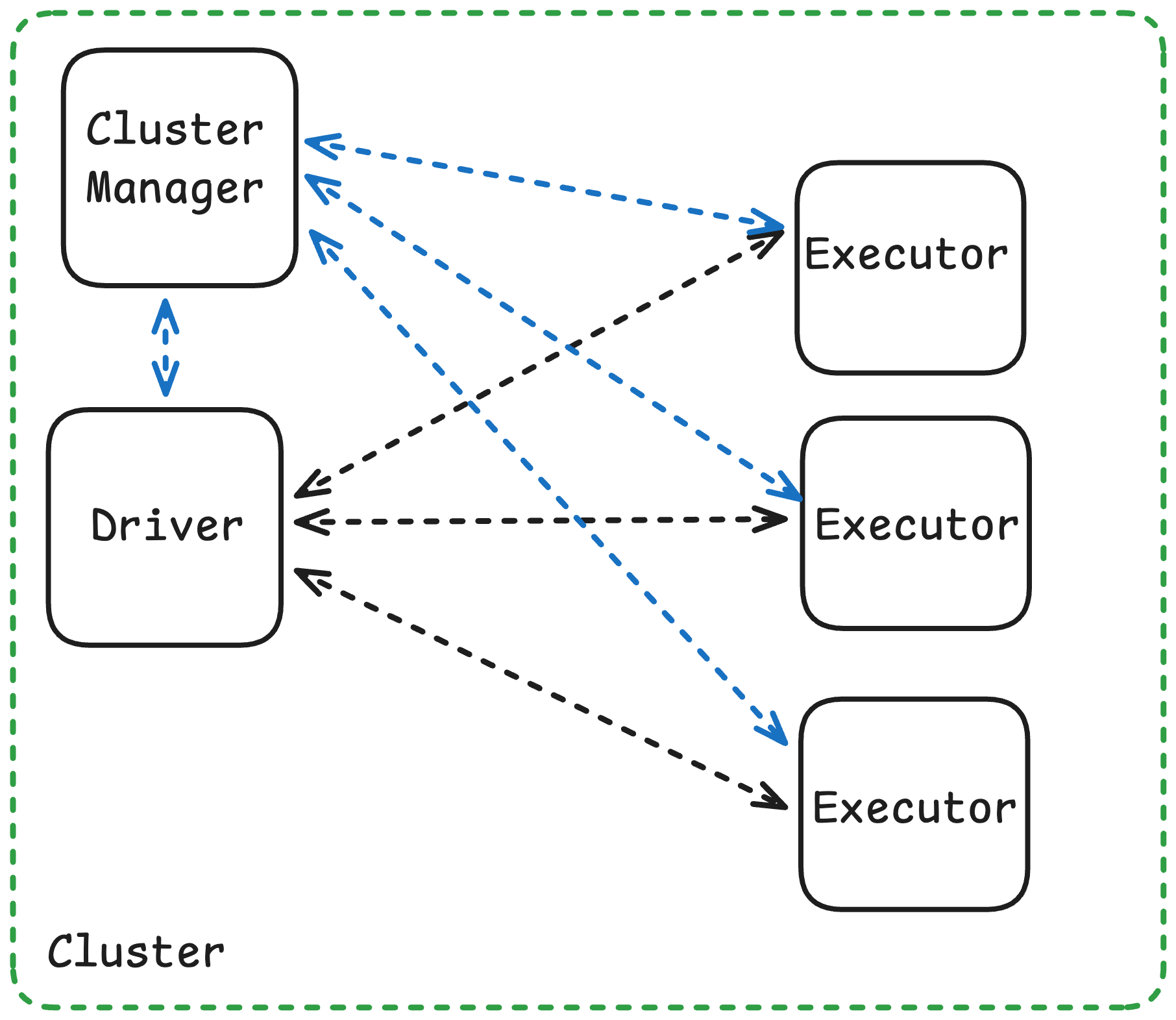
In cluster mode, the driver runs inside the cluster on one of the worker nodes, managed by the cluster manager (YARN, Kubernetes, or Standalone). The client process exits immediately after submitting the job.
Architecture
Driver runs on a cluster worker node inside an Application Master (YARN) or driver pod (Kubernetes)
Executors distributed across other worker nodes
Driver and executors communicate within cluster network (low latency)
Client machine can disconnect after submission
Best for
Production ETL pipelines and scheduled batch jobs
Long-running applications requiring high availability
Scenarios with high application concurrency
Jobs where the client machine is unreliable or resource-constrained
Key Takeaways
Local mode runs everything on one machine so use for testing, learning, and small-scale experiments
Client mode runs the driver on your machine with executors in the cluster which is ideal for interactive development and debugging
Cluster mode runs the driver inside the cluster the production standard for fault tolerance and scalability
For production, always use cluster mode for scheduled, long-running, or mission-critical jobs
For development, use client mode for notebooks and interactive exploration
Driver location determines fault tolerance, log visibility, and where results are sent
Network reliability matters in client mode, a disconnected laptop kills the entire job
Match the mode to your use case, Development needs interactivity (client), production needs reliability (cluster)